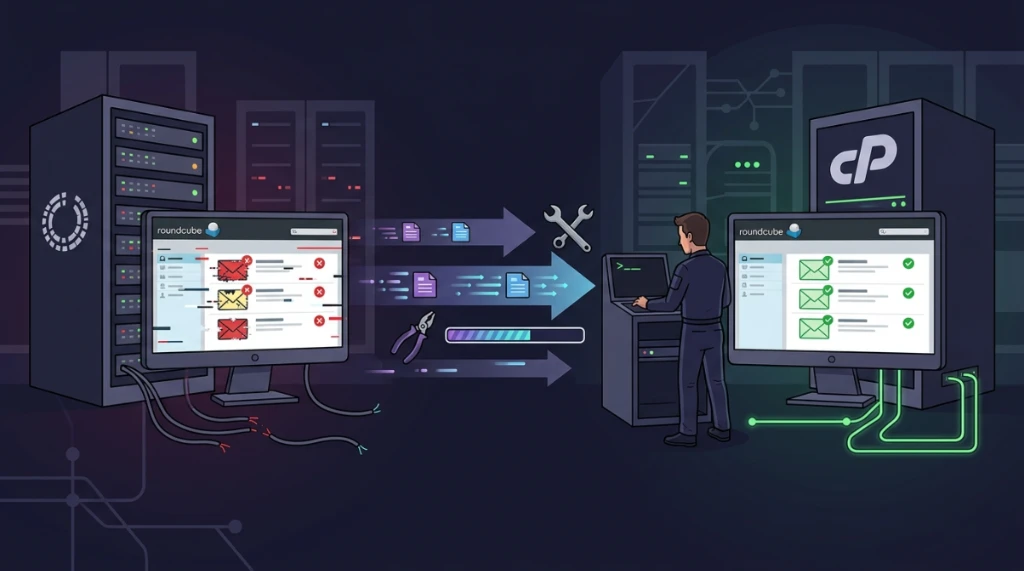
Migrating accounts between different hosting control panels frequently uncovers edge-case errors. When copying email mailboxes from VestaCP to cPanel, transferring the raw files seems straightforward at first: both platforms adopt the standard Maildir layout.
However, immediately after moving the files and opening the inbox in Roundcube webmail, you might be greeted by an unsettling error screen:
Unexpected condition from IMAP server, closed or corrupt connection to IMAP. Possible mailbox corruption.The error message sounds alarming, suggesting data loss. Fortunately, actual message loss is almost never the issue. In nearly every instance, this error occurs because Roundcube initiates an IMAP session, but Dovecot abruptly drops the connection after encountering mismatched file ownership or obsolete index files copied from the old environment.
Here is a practical troubleshooting runbook to restore IMAP connectivity smoothly without risking any underlying emails.
Why does the migration trigger IMAP connection drops?#
Although both VestaCP and cPanel store messages in discrete text files inside cur and new directories, each panel organizes file permissions and search metadata differently:
- User and group ownership (
UID/GID): In VestaCP, mail files commonly belong toadminor a systemmailgroup. In cPanel, every mailbox folder and message must belong strictly to the Linux user account owning that cPanel profile. - Dovecot index and cache files: To provide fast searching and message listing, Dovecot maintains binary index files (
dovecot.index*) and UID sequence mappings (dovecot-uidlist). Moving these files directly from VestaCP imports legacy state records that mismatch the new cPanel environment, causing Dovecot to abort the IMAP connection for safety.
1. Restoring file ownership and permissions#
First, ensure that the Dovecot daemon possesses clean read and write permissions across the entire mail tree.
Connect to your target cPanel server via SSH as root:
Realign file ownership recursively#
Change ownership of the domain mail directory to the corresponding cPanel user:
chown -R USERNAME:USERNAME /home/USERNAME/mail/DOMAIN/Replace USERNAME with the cPanel account name and DOMAIN with your migrated domain.
Run cPanel's native mail permissions fixer#
cPanel includes a built-in maintenance utility that resets directory permissions to 0700 and file permissions to 0600 throughout the mail tree:
/scripts/mailperm --user USERNAME2. Purging obsolete Dovecot index files#
This is the key step to resolving "Possible mailbox corruption". Old indexes brought over from VestaCP must be cleared.
Dovecot is designed with resilience in mind: when index files are absent, it automatically scans the physical message directories (cur/ and new/) and rebuilds healthy index files during the user's next login.
- Navigate to the affected email account folder:
cd /home/USERNAME/mail/DOMAIN/ACCOUNT/(For example: /home/myuser/mail/example.com/contact/)
- Safely remove old index and state files:
rm -f dovecot.index* dovecot.mailbox.log dovecot-uidlistTo purge index files across all subfolders within an entire mailbox at once:
find /home/USERNAME/mail/DOMAIN/ACCOUNT/ -name "dovecot.index*" -delete
find /home/USERNAME/mail/DOMAIN/ACCOUNT/ -name "dovecot-uidlist" -delete
3. Verifying maildir folder structure#
Under Dovecot's Maildir implementation, standard subfolders (such as Sent, Trash, and Drafts) must be hidden directories prefixed with a dot. Each subfolder requires its own internal cur, new, and tmp directories.
Inspect the mailbox layout:
ls -la /home/USERNAME/mail/DOMAIN/ACCOUNT/You should see:
drwx------  cur/
drwx------  new/
drwx------  tmp/
drwx------  .Sent/
drwx------  .Trash/
drwx------  .Drafts/
If archive compression stripped the leading dot during file transfer, Dovecot will fail to recognize them as valid IMAP folders and drop the connection.
4. Auditing logs in real time#
If Roundcube still produces connection errors after applying permissions and purging index files, monitor the Dovecot mail logs directly:
tail -f /var/log/maillog(Depending on your server distribution and syslog configuration, logs might also appear in /var/log/messages or /var/log/exim_mainlog).
While watching the terminal output, attempt to log in through Roundcube again. Any remaining mismatch will generate an explicit diagnostic line:
dovecot: imap(contact@example.com): Error: Corrupted index file ...: UIDs not increasing
dovecot: imap(contact@example.com): Disconnected: Internal error occurred.
This log output pinpoints the exact directory or subfolder where an unpurged index file still resides.
5. Checking cPanel disk quotas#
A common false positive for mailbox corruption is disk quota exhaustion. If the email account was created in cPanel with a default quota of 250 MB, but you migrated 1.5 GB of existing data, the account is immediately over quota.
When Dovecot cannot allocate space to create session lock files and new indexes during login, it drops the IMAP connection instantly.
- In cPanel, navigate to Email Accounts.
- Locate the mailbox and click Manage.
- Verify the allocated storage limit. Increase it to exceed the current disk usage or set it temporarily to Unlimited.
- Save the configuration and reload Roundcube.
6. Testing via external desktop clients#
To determine whether an issue lies within Roundcube or at the Dovecot daemon level, test authentication through a desktop client like Thunderbird or Outlook:
Add the account as an IMAP mailbox:
- Works in Thunderbird, fails in Roundcube: Dovecot is functioning normally. The error is isolated to webmail, typically stemming from expired PHP session files, browser cookie caching, or Roundcube temporary folder permissions.
- Fails in both Thunderbird and Roundcube: Dovecot is actively terminating the connection. Verify file ownership (
chown) and purge any lingeringdovecot.indexordovecot-uidlistfiles as outlined in steps 1 and 2.
Quick checklist for frictionless email migrations#
Whenever moving email mailboxes from VestaCP to cPanel, follow this clean sequence right after unpacking files:
- Realign ownership:
chown -R username:username /home/username/mail/domain/ - Run cPanel's mail permissions tool:
/scripts/mailperm --user username - Purge legacy index files: Delete
dovecot.index*anddovecot-uidlistso Dovecot can regenerate fresh metadata. - Confirm disk quotas in cPanel: Ensure the mailbox limit accommodates the migrated data.
- Monitor
/var/log/maillogduring initial login.
Following this workflow ensures Roundcube opens the inbox cleanly on the first attempt, with all folders and messages intact.
Was this article helpful?
Leave a quick reaction to help prioritize future technical guides:
See also

This post is licensed under CC BY-NC.
Comments
Join the discussion below.
0 comments