From Zero to VS Code: How I tamed cPanel in Docker and built a real-time dev environment#
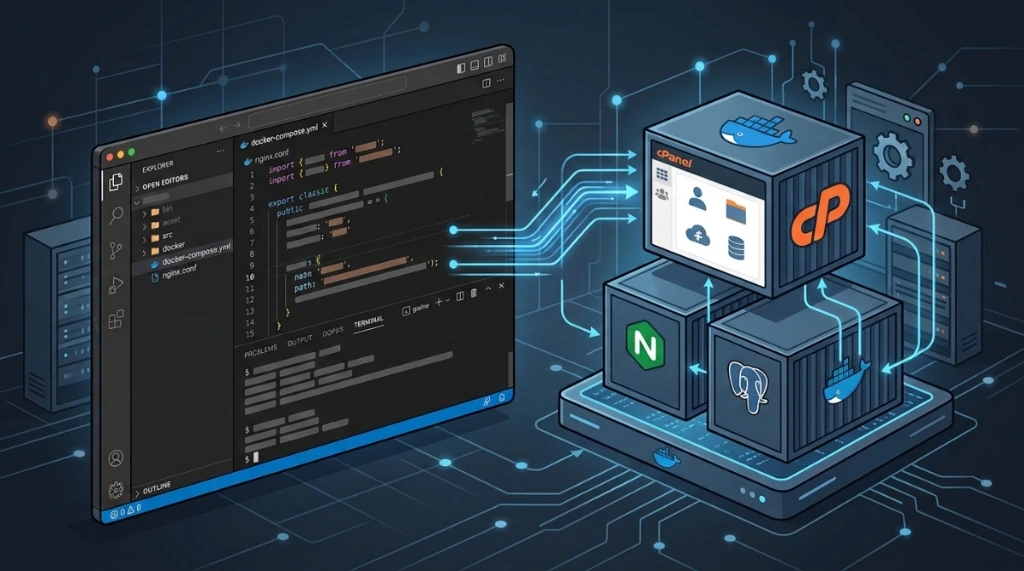
Running cPanel inside a Docker container is not a simple plug-and-play task. The cPanel stack is a complex mixture of legacy system requirements, specific filesystem behaviors, and a highly sensitive service bootstrap process that interacts directly with the system manager (systemd). My primary objective was straightforward: edit cPanel core and plugin files directly in VS Code from my host machine and have those changes reflect instantly inside the container, eliminating the manual development-to-deployment copy cycle.
This article documents the end-to-end implementation of this dev environment: from actual errors to applied diagnostics, including configurations and commands required to establish a robust and reproducible setup.
1. O cenário de desenvolvimento e cPanel em containers / the development context and cPanel in containers#
cPanel was originally designed to run directly on bare-metal servers or full virtual machines where it takes exclusive control of the operating system. Running this ecosystem inside a Docker container that shares the host's kernel requires isolating its dependencies properly. Our development laboratory requires that cPanel's internal daemons (such as HTTPD, MySQL, and DNSAdmin) start correctly and that the compilation flow persists across container recreations.
2. Requisitos do systemd e pré-requisitos do Docker / systemd requirements and Docker prerequisites#
The installer and internal services of cPanel rely on systemd to manage the lifecycle of system daemons. Running systemd inside Docker containers requires specific prerequisites:
- The container must run in privileged mode (
--privileged) to obtain system administrator capabilities; - The host's cgroups directory
/sys/fs/cgroupmust be mounted as read-write inside the container; - Mounting structured temporary paths (
tmpfs) in/runand/tmpis critical for systemd to manage local sockets and PID files; - The
cgroupns: hostparameter must be specified for namespace compatibility.
Licensing Note: cPanel requires an active license to run. For local development environments, you must use a Developer license (available on the cPanel portal) or activate the 15-day free trial period during the first bootstrap of the container.
3. Configuração da arquitetura (dockerfile e docker-compose.yml) / architecture setup (dockerfile and docker-compose.yml)#
To create a stable and reproducible environment, we use declarative configuration files. An .env environment file in the root directory should be used to load credentials without exposing secrets in code:
# Content of .env file
ROOT_PASSWORD=changeme_secure_pass_2026
SSH_PORT_CONTAINER=2222
The docker-compose.yml file encapsulates kernel permissions, cgroups mounts, and host resource limitations to prevent the container from starving the host's CPU or memory:
# docker-compose.yml
version: "3.9"

services:
  cpanel-server:
    image: almalinux:8
    container_name: cpanel-server
    privileged: true
    cgroupns: host
    deploy:
      resources:
        limits:
          cpus: '4.0'
          memory: 8gb
    volumes:
      - /sys/fs/cgroup:/sys/fs/cgroup:rw
      - cpanel_core:/usr/local/cpanel
      - type: tmpfs
        target: /run
      - type: tmpfs
        target: /tmp
    environment:
      - ROOT_PASSWORD=${ROOT_PASSWORD}
      - SSH_PORT_CONTAINER=${SSH_PORT_CONTAINER}
    ports:
      - "2222:2222"   # Custom SSH Port
      - "80:80"       # HTTP
      - "443:443"     # HTTPS
      - "2087:2087"   # WHM SSL
      - "2083:2083"   # cPanel SSL
    stop_grace_period: 60s
    security_opt:
      - seccomp=unconfined
    command: >
      /bin/bash -c "
      mkdir -p /etc && touch /etc/fstab &&
      dnf install -y openssh-server passwd systemd wget perl hostname &&
      echo 'root:${ROOT_PASSWORD}' | chpasswd &&
      echo 'Port ${SSH_PORT_CONTAINER}' >> /etc/ssh/sshd_config &&
      sed -i 's/#PermitRootLogin prohibit-password/PermitRootLogin prohibit-password/' /etc/ssh/sshd_config &&
      sed -i 's/^PasswordAuthentication yes/PasswordAuthentication no/' /etc/ssh/sshd_config &&
      systemctl stop firewalld 2>/dev/null; systemctl disable firewalld 2>/dev/null; true &&
      systemctl stop NetworkManager 2>/dev/null; systemctl disable NetworkManager 2>/dev/null; true &&
      [ ! -f /etc/fstab ] && touch /etc/fstab &&
      systemctl enable sshd &&
      exec /usr/lib/systemd/systemd"

volumes:
  cpanel_core:
4. Resolução de conflitos de rede e pacotes no AlmaLinux 8 / resolving network and package conflicts on AlmaLinux 8#
When provisioning AlmaLinux 8 inside Docker, some legacy network tools can generate dependency errors or halt builds.
- The
network-scriptspackage is deprecated starting in RHEL/CentOS 8 and was removed in AlmaLinux 8.4+. Attempting to force its installation can break the deploy script. Modern network management is handled by native utilities likeNetworkManager(which must be disabled in the container to avoid conflicts with Docker's virtual interface); - The
iptables-servicespackage has been replaced by thenftablesframework. Ensure you install only the required basic network dependencies without introducing conflicting legacy tools.
To bypass issues when disabling the firewall safely without masking critical syntax errors with the || true operator, compile the command by cleaning the standard error output:
# Safely disable firewalld
systemctl disable firewalld 2>/dev/null; true
5. O sintoma de fstab e montagens no /etc / the fstab symptom and mounts over /etc#
During the initial container boots, the cPanel installer failed due to the absence of the /etc/fstab file. This occurred because we were mounting temporary volumes or bindings directly over directories under /etc/.
This mount shadowed the container's file system during bootstrap, hiding files created earlier by the initialization script. To correct this chronological conflict, the boot script ensures the existence and touch of the /etc/fstab file immediately before handing control over to systemd execution.
6. Segurança de acesso SSH via chave pública / SSH access security via public key#
Exposing root logins via SSH using passwords passed through environment variables exposes the development container to compromise.
To harden access, we adopt exclusive SSH public key authentication, disabling password logins in the SSH daemon. The container initialization script must configure authorized keys in the root user directory:
# Configure SSH keys directory
mkdir -p /root/.ssh && chmod 700 /root/.ssh
echo "your_ssh_public_key_here" >> /root/.ssh/authorized_keys
chmod 600 /root/.ssh/authorized_keys

# Harden sshd_config inside the container
sed -i 's/#PermitRootLogin prohibit-password/PermitRootLogin prohibit-password/' /etc/ssh/sshd_config
sed -i 's/^PasswordAuthentication yes/PasswordAuthentication no/' /etc/ssh/sshd_config
7. Instalação segura com validação GPG / secure installation with GPG verification#
Downloading installers directly from the internet and executing them with administrator privileges without verification exposes the laboratory to Supply Chain Attacks. cPanel provides GPG signatures for its official installers.
To validate the integrity and authenticity of the cPanel installer before running it in the container, use the following command flow:
# Import official cPanel public key
gpg --keyserver hkps://keyserver.ubuntu.com --recv-keys 0x2443F8B3

# Download the installer and its GPG signature
curl -o latest -L https://securedownloads.cpanel.net/latest
curl -o latest.sig -L https://securedownloads.cpanel.net/latest.sig

# Verify the file signature
gpg --verify latest.sig latest

# Run installation only if the signature is valid
sh latest
8. Arquitetura de espelhamento e volumes nomeados / mirroring architecture and named volumes#
To develop on the host in real time with changes reflecting inside the container, we need to share the cPanel data directory /usr/local/cpanel/. Mounting an empty host directory directly over the container directory via a bind mount (- /home/user/dev:/usr/local/cpanel) is destructive, as it erases all binaries written by the installer during the initial deploy.
The correct technical solution is using a named volume (cpanel_core). When the container starts for the first time, Docker performs a copy-up operation, copying the pre-existing data from the container directory to the volume storage area on the host, preserving the original data.
9. Detecção do HASH da camada de volume / detecting the volume layer HASH#
After the named volume is populated by the cPanel installation process, we need to locate where these physical files reside on the host filesystem. Using the docker inspect command, we filter active container mounts:
docker inspect cpanel-server --format '{{ range .Mounts }}{{ .Source }}:{{ .Destination }}{{ "\n" }}{{ end }}'The output will display the absolute path of the volume on the host:
/var/lib/docker/volumes/projeto_cpanel_core/_data:/usr/local/cpanelThis absolute path is the actual source of the persisted files.
10. A ponte do VS code via link simbólico / the VS code bridge via symbolic link#
With the exact volume location identified on the host, we create a symbolic link pointing to the local user's development directory:
ln -s /var/lib/docker/volumes/projeto_cpanel_core/_data /home/user/dev/cpanel-coreBy opening the /home/user/dev/cpanel-core folder in VS Code on the host, the developer can view, edit, and create code files directly. Docker's filesystem updates the content instantly for processes running inside the container.
11. O erro do overlay2: operation not permitted / the overlay2 error: operation not permitted#
During removal or reconstruction of containers running logging services (such as cPanel), the Docker Daemon can return the following critical failure:
Error response from daemon: container [HASH]: driver "overlay2" failed to remove root filesystem: unlinkat /var/lib/docker/overlay2/[HASH]/diff/usr/local/cpanel/logs/dnsadmin_log: operation not permittedThis error occurs because cPanel services configure their active log files with special security attributes, such as the immutable (+i) or append-only (+a) flags, preventing the Docker daemon from executing the unlinkat call to clean the overlay2 storage driver layer.
12. Mitigação correta contra containers zumbis / correct mitigation against zombie containers#
Many administrators attempt to force removal by stopping the Docker daemon (systemctl stop docker) and manually deleting files inside the Docker directory using commands like chattr -R -i or rm -rf /var/lib/docker/overlay2/*.
Safe recovery procedure#
To remove zombie containers locked by immutable attributes of internal files, follow this secure command playbook:
- Locate files with special attributes inside the running container and remove them using
findcombined withchattr(avoiding the unreliablechattr -Rcommand):
   # Search and remove immutable attributes from local log files inside the container
find /usr/local/cpanel/logs/ -type f -exec chattr -i {} \; 2>/dev/null || true- Remove the container using the Docker CLI:
docker rm -f cpanel-server 2>/dev/null || true- Execute structured cleanup of orphaned resources and pending layers:
   # Remove orphaned containers and inactive volumes
   docker container prune -f
docker volume prune -f- If the container remains cached, restart the daemon cleanly to reload the storage state database:
   systemctl restart docker
   docker system prune -a --volumes -f
13. Impacto do SELinux em distribuições rhel-based / SELinux impact on rhel-based distributions#
AlmaLinux 8 operates with SELinux in Enforcing mode by default. When Docker attempts to instantiate containers running systemd with cgroups mounts, kernel security policies can block access, resulting in silent boot failures.
To mitigate SELinux conflicts without exposing the host to security risks, enable the SELinux boolean that allows containers to manage cgroups:
# Allow containers to manage cgroups under SELinux
setsebool -P container_manage_cgroup true
Additionally, when configuring volumes and shared folder mounts in docker-compose.yml, use the :z or :Z flag to update the SELinux label context on the corresponding host files.
14. Isolamento de redes e controle de portas / network isolation and port control#
Since the cPanel container listens on several sensitive system ports (such as SSH, WHM, and administration endpoints), it is critical to isolate the container network from unauthorized public access on the host.
- Avoid exposing all ports to global binds (
0.0.0.0); - Bind to localhost (
127.0.0.1) on the host or define an isolated Docker network (bridge network) accessible only via the developer's reverse proxy; - Use the
exposedirective instead ofportswhen the port is consumed only by other containers in the same Docker network.
15. Plano de backup e restauração de volumes / volume backup and restore plan#
Because modifications to cPanel core files can destabilize the environment, set up automated backup policies for the cpanel_core volume to prevent data loss.
Export volume backup#
To generate a compressed tarball containing the current state of the persisted volume, run:
# Back up the cpanel_core named volume to a local tar.gz file
docker run --rm -v cpanel_core:/source -v $(pwd)/backup:/dest almalinux:8 \
  bash -c "tar czf /dest/cpanel_core_$(date +%Y%m%d_%H%M%S).tar.gz -C /source ."
Restore backup to volume#
To restore the saved backup state back to the named volume, execute:
# Restore volume state from the backup tarball
docker run --rm -v cpanel_core:/dest -v $(pwd)/backup:/source almalinux:8 \
  bash -c "tar xzf /source/cpanel_core_backup.tar.gz -C /dest"
16. Validação do espelhamento de arquivos / validating file mirroring#
To ensure the mirroring flow is stable and persists after container shutdowns or recreations, run the following validation checks:
# 1. Create a test file using an absolute path inside the container
docker exec -it cpanel-server touch /usr/local/cpanel/test_persistence.txt

# 2. Check if the file appears in the local host directory
ls -la /home/user/dev/cpanel-core/test_persistence.txt

# 3. Recreate the environment using docker compose
docker compose down
docker compose up -d

# 4. Validate that the test file still exists inside the container post-boot
docker exec -it cpanel-server ls -la /usr/local/cpanel/test_persistence.txt
This test confirms the volume retains state and that the VS Code bridge is bidirectionally synchronized.
17. Playbook SRE de troubleshooting cPanel no Docker / SRE cPanel in Docker troubleshooting playbook#
During the operation of the local development lab, use the following quick-start resolution guide for common issues:
- Systemd Boot Failure: Verify that the container was started with the
privileged: trueandcgroupns: hostflags active in the Compose file. - SSH Port 22 Conflict: Ensure the
SSH_PORT_CONTAINERvariable in the.envfile points to an unused port on the host (such as2222). - Query Slowness: Add explicit RAM and CPU limitations in the Compose file to prevent memory leaks from the internal cPanel MySQL server.
- Permission Mismatches: If files edited in VS Code present write permission errors inside the container, audit directory ownership on the host:
  # Correct ownership of the shared folder on the host
  chown -R root:root /var/lib/docker/volumes/projeto_cpanel_core/_data
18. Matriz de riscos de ambiente de desenvolvimento / development environment risk assessment matrix#
| Risk Event | Severity | Technical Impact | Recommended Mitigation |
|---|---|---|---|
| Privilege Escalation (Privileged Mode) | High | Using --privileged disables container isolation, allowing malicious processes to access the host. | Restrict this environment exclusively to offline local development environments. |
| Layer Corruption (Overlay2) | High | Manually editing files in the /var/lib/docker directory damages daemon metadata, breaking Docker. | Never modify Docker host storage files directly; use docker system prune and restart the daemon. |
| SSH Key Compromise / Weak Passwords | Medium | Weak root passwords or exposed private keys allow unauthorized access to the container. | Disable password authentication and allow logins exclusively via public SSH keys. |
| Mount Conflicts in /etc | Medium | Mounting volumes directly over /etc shadows critical OS configuration files, breaking boot. | Use boot scripts that touch and verify the integrity of configurations immediately before systemd handoff. |
| Host Resource Exhaustion | Low | Heavy cPanel background services can consume 100% of host CPU or RAM, freezing the host machine. | Configure explicit CPU and memory resource limits in the Docker Compose service definition. |
Was this article helpful?
Leave a quick reaction to help prioritize future technical guides:
See also


This post is licensed under CC BY-NC.
Comments
Join the discussion below.
0 comments