
I spent nearly ten years installing Yoast SEO on almost every WordPress instance I deployed to production. It was standard muscle memory: configure Linux, tune Nginx, set up MariaDB, and install Yoast. For a long time, it handled the job well.
Search has changed, however, and older tools largely remained tied to patterns from a decade ago.
Today, competing solely for the standard ten blue links on Google is only part of the equation. A meaningful portion of qualified traffic reaching my technical sites now comes from AI answer engines: Perplexity, ChatGPT Search, Claude, and Google AI Overviews.
This practical shift is known as Generative Engine Optimization (GEO). AI answer engines do not spend time counting keyword repetitions in paragraphs. They look for who authored the piece, the verified authority behind the source, and the exact steps to solve a problem. They parse this directly out of structured Schema.org data.
When I audited what my web servers were providing to these crawlers, I tested Yoast and Rank Math side by side in an isolated staging environment. The test convinced me to switch permanently. Here is what I observed in the rendered markup, PHP memory footprint, server security posture, and real indexation metrics.
1. What actually changes with AI search (GEO)#
Traditional search engines crawl raw HTML pages, look at title tags, and calculate relevance through backlink graphs. Generative AI engines operate on Retrieval-Augmented Generation (RAG) pipelines.
The practical difference is clear. When someone asks Perplexity or ChatGPT "how to tune FastCGI buffers in Nginx", the model does not crawl the entire web from scratch in that instant. It retrieves candidate documents from its vector index and prioritizes structured sources.
When an article provides a clean Schema JSON-LD graph, the AI parser extracts the core entities immediately:
- The verified author via the
Personnode and confirmation URLs insameAs. - The technical topic within
TechArticleandabout. - Sequential terminal commands through
HowToStep. - Frequently asked questions ready for citation in
FAQPage.
If a site serves flat HTML without semantic markup, the AI bot has to interpret the text through guesswork. When forced to guess, it tends to cite a competing source that already provided structured entities. That is where the architectural difference between the two plugins matters most.
2. Inspecting the JSON-LD output in practice#
I checked the rendered source code generated by both plugins on the same technical article to compare how each handles structured data.

Yoast and schema constraints#
Yoast was an early adopter of unified graphs with @graph. The limitation appears when you attempt to customize it on standard plans: you are mostly stuck with basic types.
It outputs generic items (WebSite, WebPage, Article) and leaves little room for customization. If you need to declare a page as a technical guide (TechArticle) with command steps (HowTo) and troubleshooting answers (FAQPage) all on one URL, the interface does not accommodate it.
To unlock types such as SoftwareApplication, Dataset, Review, or Local Business schemas, Yoast requires separate add-on subscriptions at 99 dollars per year each (WooCommerce SEO, Local SEO, News SEO). The alternative is writing manual filter hooks in functions.php. I would rather spend server time tuning performance than maintaining custom hooks for features that should be native.
Rank Math and modular schema#
With Rank Math, schema management was built from the start as a visual modular tool.
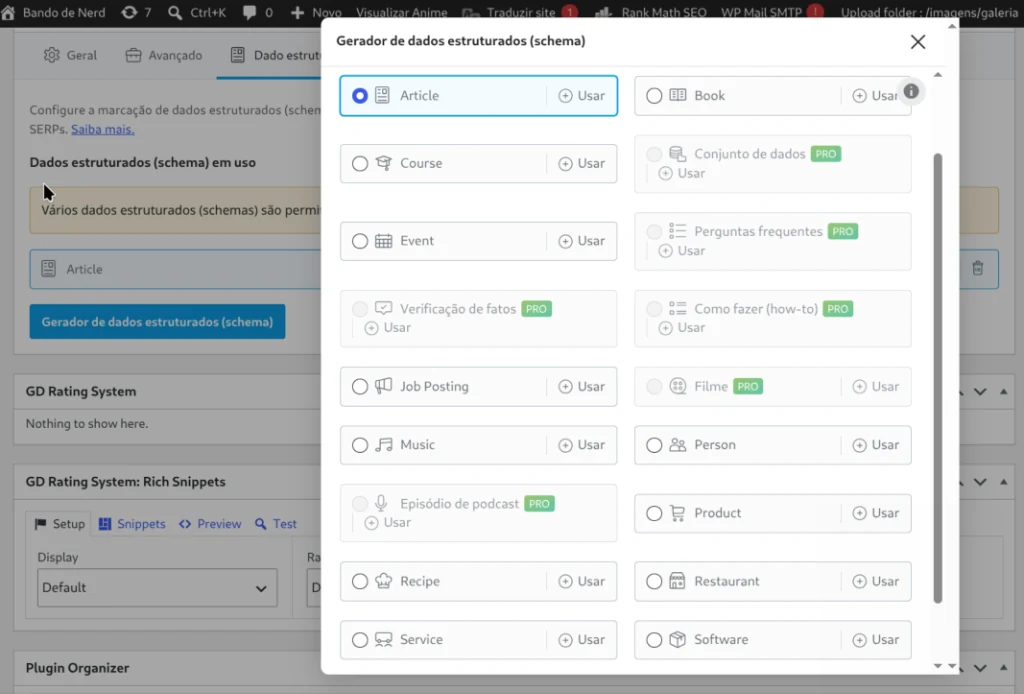
Even in the free edition, it includes a broad range of ready-to-use types: Articles, Books, Courses, Events, FAQs, HowTo guides, Job Postings, Local Businesses, Music, Products, Recipes, Restaurants, Videos, Services, and Software Applications.
You can combine multiple schema types on the same post without syntax conflicts. The custom builder also allows importing validated schemas from external URLs, pasting raw JSON-LD, or setting conditional display rules by category.
Here is a real example of the graph output Rank Math produces, connecting author, organization, and technical instructions:
{
  "@context": "https://schema.org",
  "@graph": [
    {
      "@type": "Organization",
      "@id": "https://perciocastelo.com.br/#organization",
      "name": "Percio Castelo",
      "url": "https://perciocastelo.com.br/"
    },
    {
      "@type": "Person",
      "@id": "https://perciocastelo.com.br/#author",
      "name": "Percio Castelo",
      "sameAs": [
        "https://github.com/sr00t3d",
        "https://www.linkedin.com/in/perciocastelo/"
      ]
    },
    {
      "@type": "TechArticle",
      "@id": "https://perciocastelo.com.br/article/#article",
      "headline": "Linux Server Tuning for High Traffic WordPress",
      "author": { "@id": "https://perciocastelo.com.br/#author" },
      "publisher": { "@id": "https://perciocastelo.com.br/#organization" },
      "mainEntityOfPage": "https://perciocastelo.com.br/article/"
    },
    {
      "@type": "HowTo",
      "name": "Nginx FastCGI Buffer Configuration Steps",
      "step": [
        {
          "@type": "HowToStep",
          "position": 1,
          "name": "Tune FastCGI Buffers",
          "text": "Set fastcgi_buffers 16 16k inside your server block configuration."
        }
      ]
    }
  ]
}
For an AI answer engine that evaluates sources before assembling a response, this level of semantic detail provides verifiable context.
3. Native IndexNow: indexed in minutes, not weeks#
This was a deciding factor when migrating client installations.
In the conventional search model, indexing is passive: you publish an article, the sitemap updates, and you wait for Googlebot or Bingbot to crawl your site. This can take anywhere from two days to three weeks. For time-sensitive guides or security advisories, that delay is inconvenient.
IndexNow changes this to a push mechanism. When you hit publish or update, WordPress immediately dispatches an HTTP POST request to the IndexNow API (used by Bing, Yandex, and partner AI engines).
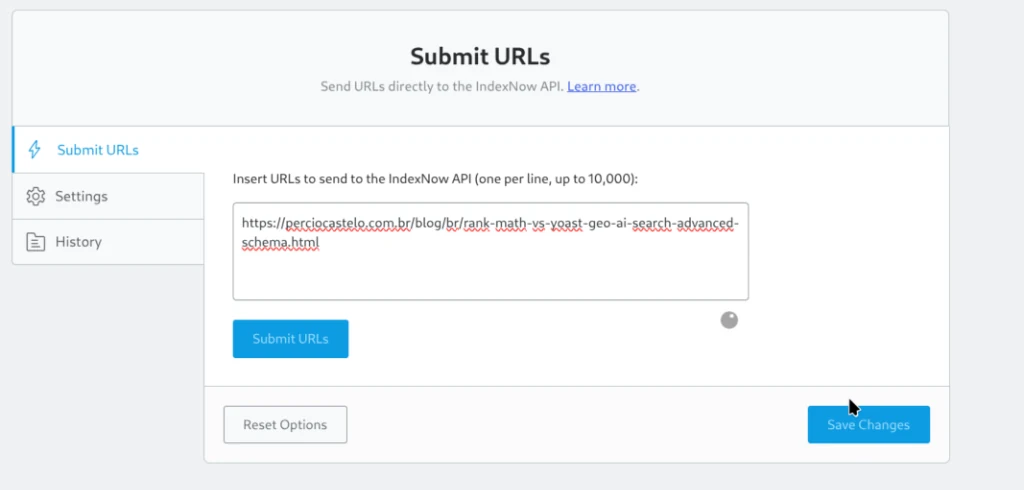
Yoast lacks native IndexNow support. To use it, you have to add an extra third-party plugin to your setup.
In Rank Math, the feature is built into the Instant Indexing module. I enabled the toggle, generated the API key, and submitted this post URL directly through the interface shown above. When checking Nginx server logs, I saw Bingbot fetch the URL less than three minutes after the notification was sent. For search tools relying on Bing indexes, including ChatGPT Search and Copilot, the quick discovery is evident.
4. Server resource footprint: memory and modularity#
Running Linux infrastructure means constantly evaluating plugins for memory consumption and PHP-FPM impact.
Yoast operates as a monolith. It loads its core codebase on every request cycle, even when specific features are not being utilized.
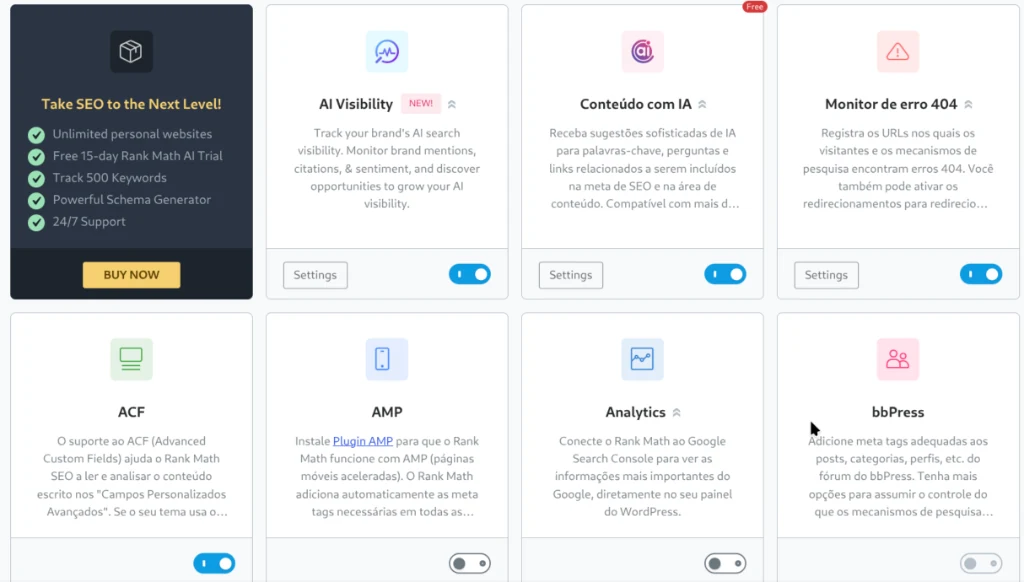
Rank Math relies on independent module switches. If I do not need WooCommerce support, the e-commerce classes never load into PHP memory. If I turn off the 404 monitor, those hooks never run against MariaDB.
| Feature or Metric | Yoast SEO (Free or Premium) | Rank Math (Free or Pro) |
|---|---|---|
| Architecture | Monolithic, loads full code base | Modular, loads only active modules |
| PHP Overhead | Heavier in wp-admin screens | Leaner through selective loading |
| Native IndexNow | No (requires third-party plugin) | Yes, built into Instant Indexing module |
| Free Schema Options | Basic generic types | 14+ rich schema templates included |
| Multi-Schema per URL | Restricted | Flexible |
| 404 Monitor and Redirects | Gated behind 99 USD/year tier | Included in the free core edition |
| Robots and .htaccess Tools | Basic | Integrated direct editor |
| Technical SEO Auditing | Simplified traffic lights | 30+ technical checks |
5. Cybersecurity perspective: attack surface and llms.txt#
In web operations, security comes before marketing tactics. Evaluating both plugins through an application security perspective highlights noticeable differences.

Attack surface reduction#
Each plugin in WordPress introduces potential risk: REST API endpoints, database hooks, and code that could contain vulnerabilities. When a minor plugin is abandoned by its author, it turns into unpatched technical debt.
To match what Rank Math includes natively, a Yoast setup usually requires several auxiliary plugins: one for 301 redirects, one for 404 logs, one for schema customization, one for IndexNow, and another for server file editing.
Consolidating these responsibilities into a single modular plugin eliminates multiple third-party dependencies from wp-content/plugins and reduces attack surfaces.
Hardening for AI engines with llms.txt#
In the sidebar menu of the screenshot above, you can see native management for llms.txt.
Much like robots.txt directs search engine crawlers, llms.txt is the emerging open format used by companies like Anthropic and OpenAI to understand how content is organized. From the dashboard, you can:
- Guide language models on which summaries and pages to consult for accurate answers.
- Prevent crawlers from indexing private paths, client staging folders, or sensitive assets.
- Block aggressive scrapers that consume CPU and bandwidth by adding rules directly in
robots.txtand.htaccess.
Native Model Context Protocol (MCP) server#
Rank Math introduced a native MCP server built on the WordPress Abilities API. This lets AI tools like Claude Desktop or Cursor audit and adjust SEO metadata through conversational prompts.
From an access control standpoint, this addresses an old security challenge: rather than sharing master administrator passwords or opening SSH access to automation tools, the MCP server uses WordPress Application Passwords. You can revoke tokens individually at any time from the user profile, keeping access aligned with the principle of least privilege.
6. Technical efficiency benchmark graph#
Summarizing the tests conducted in my benchmarking lab, here is the direct comparison between both approaches:
Schema Flexibility & GEO (AI Answer Engines)
Rank Math:  [███████████████████░] 95%  (14+ native types, multi-schema stacking per URL)
Yoast SEO:  [████████░░░░░░░░░░░░] 40%  (locked to basic types without 99 USD add-ons)

Instant Indexing Push Speed (IndexNow API)
Rank Math:  [████████████████████] 100% (Instant Indexing module with real-time push)
Yoast SEO:  [███░░░░░░░░░░░░░░░░░] 15%  (no native support, requires third-party plugins)

Attack Surface Reduction (Plugin Consolidation)
Rank Math:  [██████████████████░░] 90%  (replaces up to 5 standalone utility plugins)
Yoast SEO:  [█████████░░░░░░░░░░░] 45%  (fragmented ecosystem dependent on external add-ons)

AI Crawl Control & Hardening (llms.txt & MCP)
Rank Math:  [██████████████████░░] 90%  (native llms.txt, robots editor, and MCP server)
Yoast SEO:  [████░░░░░░░░░░░░░░░░] 20%  (no native llms.txt or MCP server integration)
7. How I migrate from Yoast to Rank Math without ranking drops#
The primary concern when updating production sites is avoiding disruptions to titles, meta descriptions, and organic rankings.
I have performed this migration on installations with over five thousand indexed pages. The process is straightforward because Rank Math reads existing Yoast database entries and imports them directly.
The routine I run:
First, export a full database backup from the terminal:
wp db export backup-pre-seo-migration.sqlNext, install and activate Rank Math with WP-CLI:
wp plugin install seo-by-rank-math --activateUpon opening the dashboard, the setup wizard detects the existing Yoast configuration. Choose the import option. The tool copies titles, descriptions, Open Graph tags, and indexing directives into Rank Math tables.
After inspecting several URLs in the browser to confirm that output meta tags match previous values, deactivate Yoast:
wp plugin deactivate wordpress-seoRankings remain stable because search engines receive identical metadata, now backed by connected Schema JSON-LD graphs and active IndexNow notifications.
8. My honest verdict after migrating dozens of sites#
I worked with Yoast for nearly a decade across hundreds of servers. It has historical significance and helped establish basic SEO standards in WordPress. However, its current pricing model charges for routine features and forces administrators to install extra plugins for everyday tasks.
Rank Math provides more modularity, security utilities, and structured data control in its free tier than Yoast offers in paid licenses. If your goal is preparing content for AI answer engines, structuring Schema without custom PHP hooks, and accelerating indexation with IndexNow, Rank Math is the more practical tool for modern WordPress setups.
It is worth evaluating the free version on a staging environment or testing the advanced features in Rank Math. The improvement in administration workflow is noticeable early on.
Was this article helpful?
Leave a quick reaction to help prioritize future technical guides:
See also




This post is licensed under CC BY-NC.
Comments
Join the discussion below.
0 comments