
When spinning up a virtual instance on Oracle Cloud Infrastructure (OCI) to run a custom web application or container, developers almost always run into the same roadblock: you configure the ingress rule in the web console, yet external connections either time out or get refused.
The reason is straightforward: in OCI, opening a port requires aligning three independent layers before traffic can ever reach your application code.
1. The 3 network blocking layers in OCI#
When an external client attempts to connect to your instance, the packet follows this path:
[External Client]
       │
       ▼
1. Cloud Edge (VCN / Security Lists / NSG)
       │
       ▼
2. Linux Kernel (iptables / nftables / firewalld)
       │
       ▼
3. Application Socket (Binding to 0.0.0.0 or :::)- Cloud Edge (VCN): Ingress rules applied to the subnet (Security List) or VNIC (NSG). If missing here, the packet is discarded before entering the VM.
- Linux Kernel: Official OCI images (Ubuntu, Oracle Linux, RHEL) ship with active firewalls rejecting non-SSH traffic by default.
- Application Socket: Your application must listen on wildcard addresses (
0.0.0.0). If bound only to127.0.0.1, the kernel will reject external connections.
2. Opening ports cleanly#
Step 1: Open the port in the OCI console (Security Lists)#
Following recent Oracle Cloud Infrastructure (OCI) console updates, the navigation flow and network menus have been reorganized. Here is the updated step-by-step path:
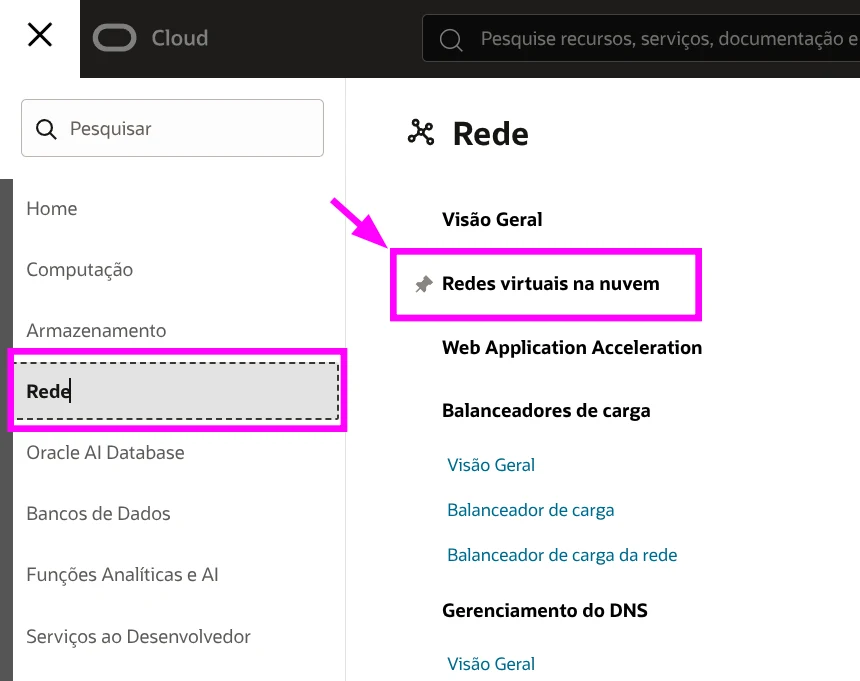
- Navigate to Virtual Cloud Networks: Open the navigation menu in the top-left corner (hamburger icon), hover over Networking, and select Virtual cloud networks.
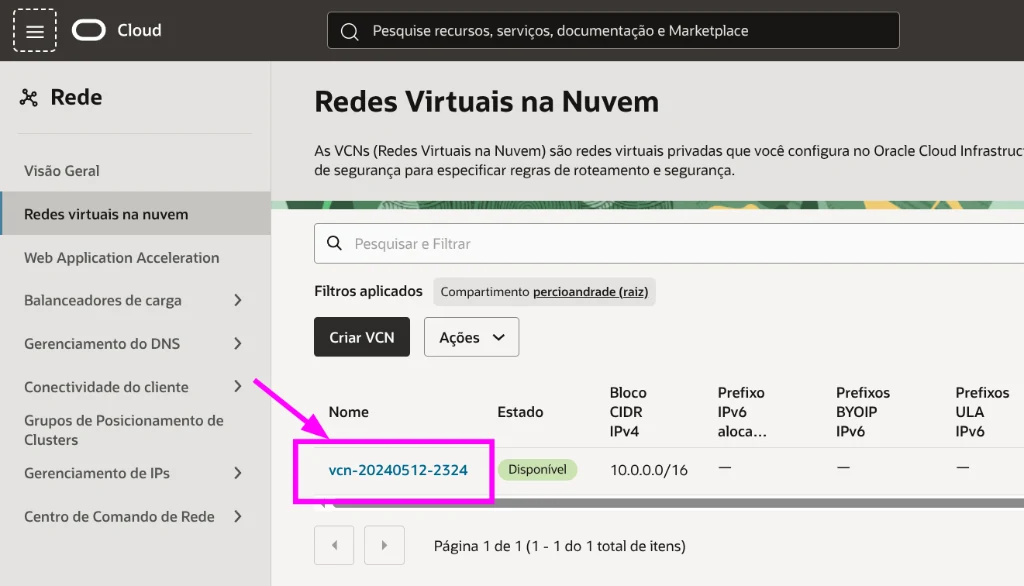
- Select your VCN: In the virtual cloud networks list for your compartment, click your active VCN name (for instance,
vcn-20240512-2324).
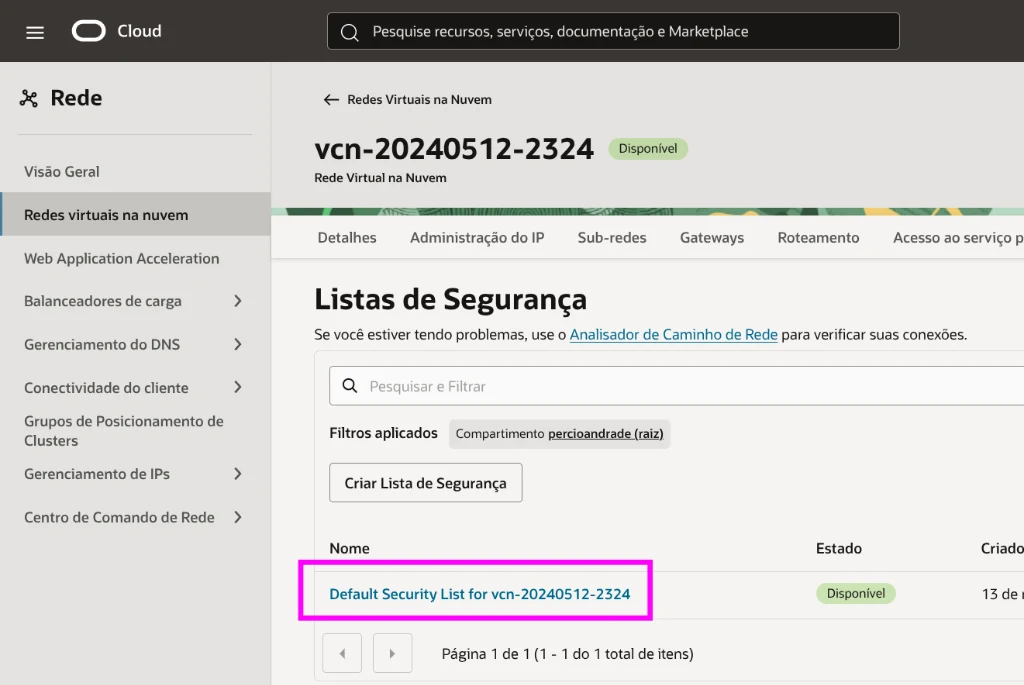
- Access Security Lists: On the left navigation pane under Resources, click Security Lists and choose the security list attached to your subnet (typically
Default Security List for vcn-...).
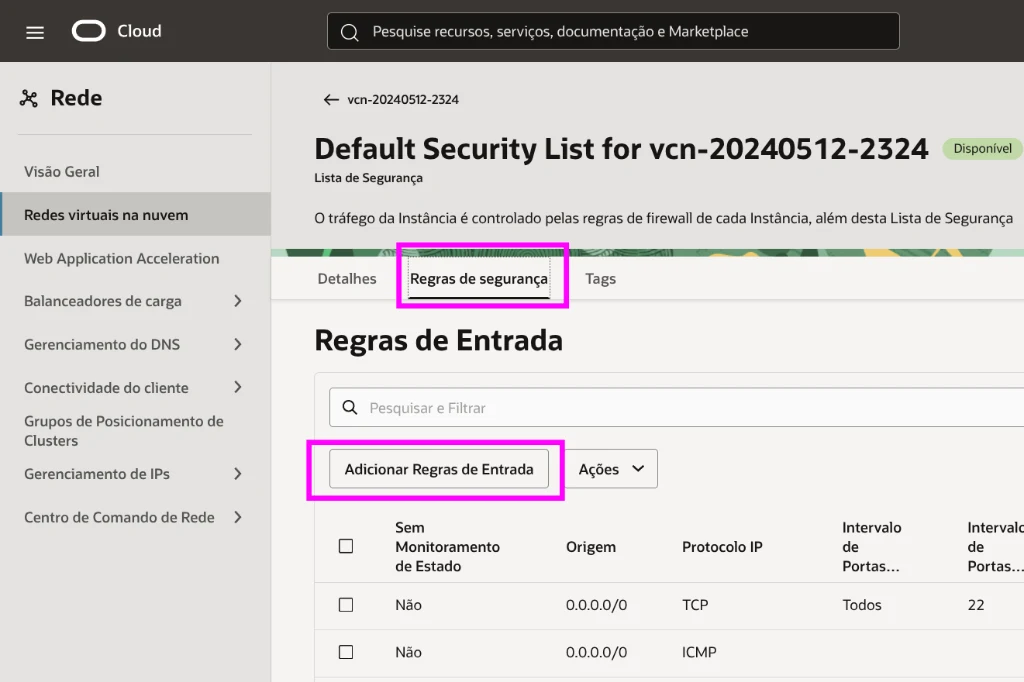
- Add Ingress Rules: Inside the security list view, switch to the Security rules tab and click Add Ingress Rules.
In the ingress rule creation dialog, fill in the parameters:
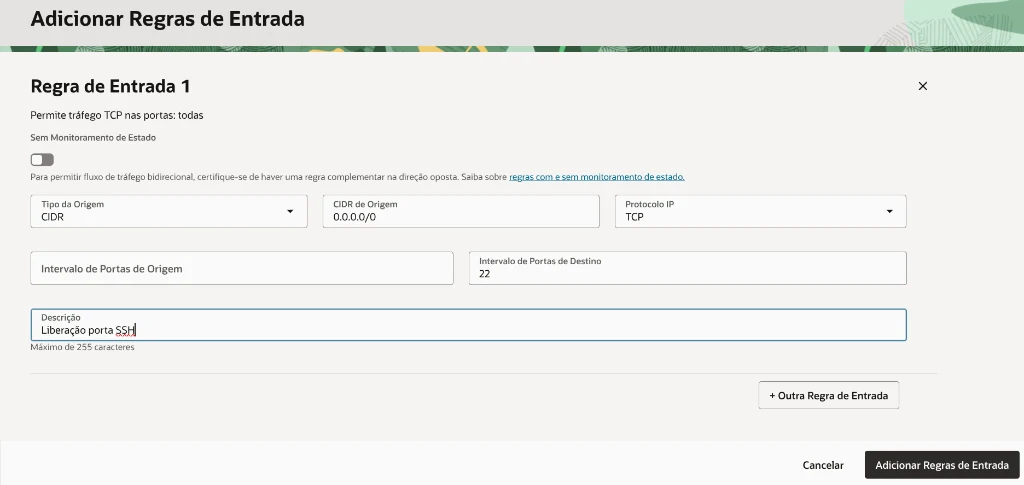
- Stateless: Keep unchecked by default (stateful filtering automatically allows response packets without needing reverse rules).
- Source Type:
CIDR - Source CIDR:
0.0.0.0/0(for public Internet access) or your specific source IP to restrict exposure. - IP Protocol:
TCP(or UDP, depending on your application). - Source Port Range: Leave blank (permits incoming packets from all client ephemeral ports).
- Destination Port Range: The port your server application listens on (e.g.
8088,9090, or22for SSH). - Description: A descriptive label (e.g.
SSH port ruleorApp web dashboard). - Click Add Ingress Rules.
To automate via CLI:
# Add TCP ingress rule via OCI CLI
# Warning: the update command overwrites all ingress rules.
# Query existing rules first with 'oci network security-list get' to merge with existing entries (e.g. SSH port 22) or use a dedicated NSG.
oci network security-list update \
  --security-list-id <SECURITY_LIST_OCID> \
  --ingress-security-rules '[{"source": "0.0.0.0/0", "protocol": "6", "tcpOptions": {"destinationPortRange": {"min": 8088, "max": 8088}}}]'
Step 2: Adjust internal Linux firewall rules#
On Ubuntu / Debian in OCI#
# 1. Insert rule at top of INPUT chain
sudo iptables -I INPUT 1 -p tcp --dport 8088 -j ACCEPT

# 2. Persist rules across reboots
sudo apt-get install iptables-persistent -y
sudo netfilter-persistent save
On Oracle Linux / RHEL#
sudo firewall-cmd --zone=public --add-port=8088/tcp --permanent
sudo firewall-cmd --reload
Step 3: Verify socket bindings#
Check that your process is listening on public interfaces:
sudo ss -tulpn | grep 8088- Correct:
0.0.0.0:8088or*:8088 - Incorrect (local only):
127.0.0.1:8088
3. Pinpointing where the connection drops#
Run a test from your local development machine:
# Test remote port via Netcat
nc -zv -w 3 <OCI_PUBLIC_IP> 8088| Test Output | Bottleneck Location | Action |
|---|---|---|
| Connection Timed Out | Cloud Edge (VCN) | Security List or NSG is missing the ingress rule. |
| Connection Refused | OS Firewall or App | Packet reached the VM, but was rejected by iptables or app is down. |
| Connected / Open | All Clear | Connection established successfully. |
Conclusion: practical tips for OCI networking#
- Always persist iptables rules: On OCI Ubuntu, in-memory iptables edits vanish on reboot unless saved with
netfilter-persistent save. - Use Network Security Groups (NSGs): Security Lists apply to the entire subnet. If you only want a port open on one machine, use an NSG.
- Inspect packet counters: Run
sudo iptables -L INPUT -n -vand check if thepktscount increments when you attempt a connection. - Tune memory architecture: On ARM/Free Tier instances with constrained memory, set up an appropriate Linux kernel swapfile to prevent OOM killer crashes under traffic spikes.
Was this article helpful?
Leave a quick reaction to help prioritize future technical guides:
See also




This post is licensed under CC BY-NC.
Comments
Join the discussion below.
0 comments