
In the WordPress ecosystem, installing an extension with a single click inside the admin dashboard is one of its greatest strengths — and simultaneously the primary cause of downtime and performance degradation on production servers.
For developers and content editors, a plugin may seem like just another feature. In production infrastructure, every active plugin represents additional PHP execution overhead on every request lifecycle, new database queries against MariaDB/MySQL, potential synchronous blocking hooks on PHP-FPM worker threads, and an expanded attack surface for automated scanners.
In this guide, I break down battle-tested engineering criteria to evaluate and manage plugins, compare the architectural advantages of modern site builders (BricksBuilder) over legacy page builders, explain precision shielding with WP Hide & Security Enhancer, and show how to keep your deployment aligned with the 101 directives in my WPLista: Interactive WordPress Hardening Checklist.
1. The Hidden Infrastructure Cost of "Just One More Plugin"#
When a visitor requests a dynamic page in WordPress, the core runtime boots wp-config.php, establishes the database connection, loads core routines, and iterates over every entry inside the active_plugins array stored in the database.
HTTP Request ──> Nginx / Apache ──> PHP-FPM Pool (Worker Thread Allocated)
                                          │
                ┌─────────────────────────┴─────────────────────────┐
                ▼                                                   ▼
     Core Runtime Initialized                              Active Plugins Loaded
                │                                                   │
                ▼                                                   ▼
     Autoload Queries (wp_options)                         Filters & Actions (init/wp_loaded)
                │                                                   │
                └─────────────────────────┬─────────────────────────┘
                                          ▼
                             Rendered Response (HTML)
In an uncurated installation with 35 or 50 active plugins, multiple bottlenecks compound silently:
- PHP-FPM Worker Pool Exhaustion (
pm.max_children): Each PHP worker process consumes between 40 MB and 120 MB of RAM depending on loaded extensions. If poorly written plugins trigger synchronous outbound HTTP calls or loop over unindexed data on global hooks (initorwp_loaded), execution latency jumps from 80ms to 600ms. Under traffic spikes, available workers saturate immediately, resulting inHTTP 502 Bad GatewayorHTTP 504 Gateway Timeouterrors. - Uncontrolled Autoload Bloat (
wp_options): Many plugins store settings and cached objects withautoload = 'yes'. This data is loaded into PHP memory on every single request, including lightweight REST API calls. When autoload payloads exceed 1.5 MB, per-request memory allocation and CPU overhead climb dramatically. - Asset Leaking Across Unrelated Pages: Contact form extensions, slider tools, and analytics scripts frequently register CSS stylesheets and JavaScript bundles globally, degrading Interaction to Next Paint (INP) and Largest Contentful Paint (LCP) across the entire site.
2. The 5 Commandments Before Approving Any Plugin#
Before installing any third-party plugin on a production server or critical client environment, run it through these five technical filters:
1. Autoload Payload Audit via WP-CLI#
Connect via SSH and inspect the exact footprint the plugin adds to your database autoloading memory. On hardened production servers — where the default wp_ table prefix has been modified for security —, use WP-CLI's dynamic prefix resolution:
# Query the heaviest autoloaded options (dynamic table prefix)
wp db query "SELECT option_name, LENGTH(option_value) AS byte_size FROM \$(wp db prefix)options WHERE autoload = 'yes' ORDER BY byte_size DESC LIMIT 10;"

# Calculate total autoload payload loaded into PHP memory per request (in MB)
wp db query "SELECT ROUND(SUM(LENGTH(option_value))/1024/1024, 2) AS total_autoload_mb FROM \$(wp db prefix)options WHERE autoload = 'yes';"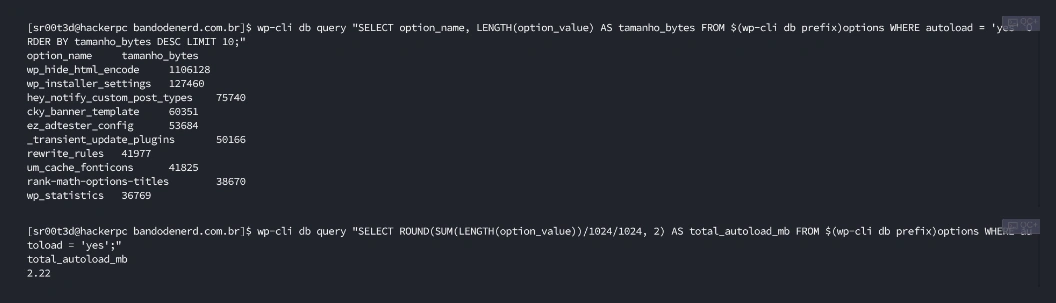
If an extension creates oversized serialized options (such as embedded HTML caches or transients that never expire), verify if it is strictly necessary in production or implement persistent object caching with Redis.
2. Zero Blocking Synchronous External HTTP Requests#
Many plugins check license validation or fetch vendor news feeds during dashboard initialization. If the vendor's external API experiences downtime or high latency, your WordPress admin dashboard freezes. Audit execution hooks with WP-CLI:
wp profile stage --all --spotlight3. CVE History and Vendor Patch Velocity#
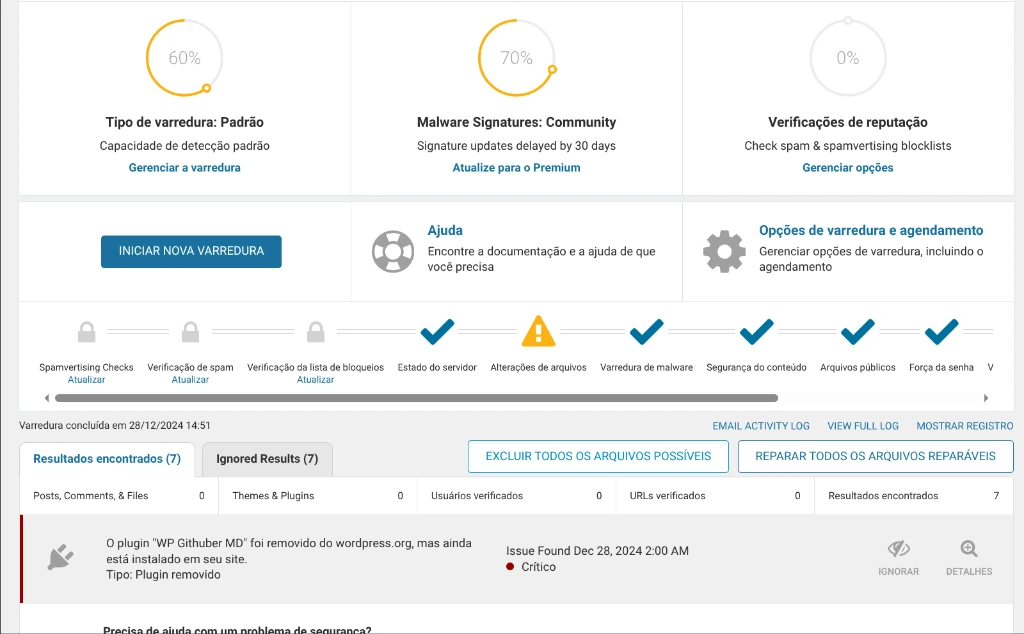
Review the plugin's vulnerability history in specialized databases such as Wordfence Intelligence, WPScan, or the National Vulnerability Database (NVD). Having past disclosed vulnerabilities is common for widely adopted extensions — the decisive metric is the maintainer's patch turnaround velocity. If the development team reliably ships security patches within 24–48 hours of disclosure, the project is active and trustworthy. If vulnerabilities linger unpatched for weeks — or if the extension has been removed from WordPress.org — eliminate it from production immediately.
In day-to-day operations, the scanner built into Wordfence Security automates this inspection continuously: it verifies core and plugin file integrity against official repository checksums, matches installed versions against the live Wordfence Intelligence vulnerability feed, and alerts administrators whenever an extension is flagged with an unpatched CVE or marked as abandoned.
4. PHP 8.2+ Compatibility and Deprecation Hygiene#
Ensure the plugin does not emit hundreds of deprecation warnings (PHP Deprecated) to your web server logs (error_log). Unchecked deprecations pollute disk storage and impose avoidable I/O overhead on system loggers.
5. Native Support for Persistent Object Caching (Redis / Memcached)#
Enterprise-grade plugins must make proper use of WordPress's wp_cache_*() API. On production instances running Redis Object Cache, extensions that bypass the caching abstraction and execute repetitive, unbuffered raw SQL queries defeat the purpose of in-memory caching.
3. Site Builders: BricksBuilder vs. Monolithic Page Builders#
For years, the market defaulted to visual builders like Elementor and Divi. While they offer intuitive drag-and-drop interfaces for non-technical users, their underlying architecture imposes severe performance penalties on production infrastructure.
The Architectural Cost of Elementor#
Elementor is notorious for "DOM Explosion". Rendering a simple heading and styled paragraph often involves 6 to 8 nested container wrappers (.elementor-section, .elementor-container, .elementor-row, .elementor-column, .elementor-widget-wrap, .elementor-widget-container).
Furthermore, it enqueues multiple monolithic stylesheets and legacy script libraries (Swiper, Waypoints, FontAwesome, polyfills) even on simple static templates. This unnecessary payload hurts Core Web Vitals and forces server administrators to provision oversized VPS instances with extra vCPUs simply to sustain acceptable response times.
Monolithic DOM (Elementor)            Clean Semantic DOM (BricksBuilder)
──────────────────────────────        ───────────────────────────────────
<div class="elementor-section">        <section class="hero">
  <div class="elementor-container">      <div class="hero__content">
    <div class="elementor-row">            <h1>High-Performance Heading</h1>
      <div class="elementor-column">       <p>Lean semantic markup, zero bloat.</p>
        <div class="elementor-widget">   </div>
          ... (8 levels of nesting)   </section>
Why BricksBuilder Is Technically Superior#
From a server engineering and DevSecOps perspective, BricksBuilder represents a massive leap forward:
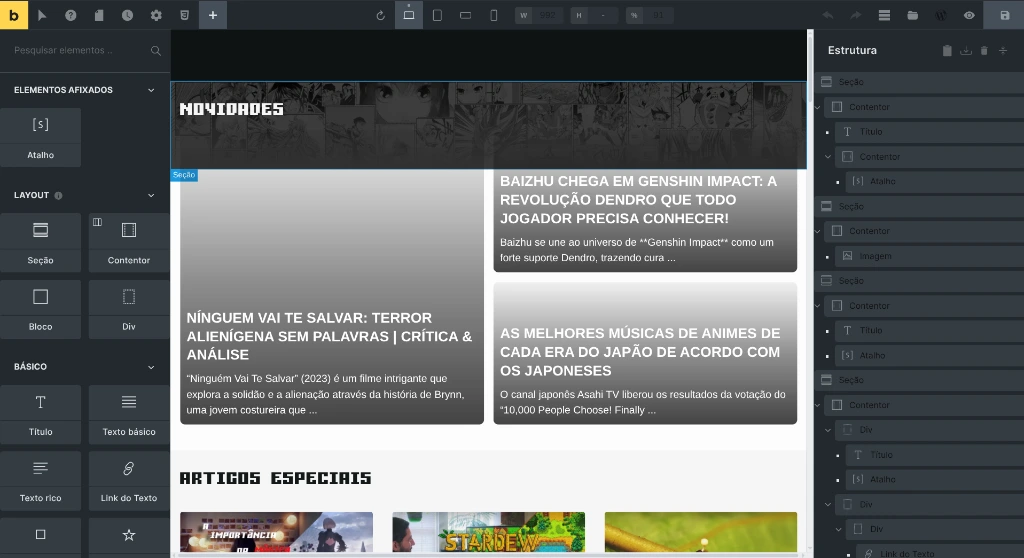
- Lean Semantic HTML5 Markup: Generates clean, accessible markup without ghost wrappers or arbitrary div wrappers, reducing total DOM nodes by up to 70%.
- Conditional Asset Loading: Bricks parses template requirements and serves only the CSS and JavaScript needed for the components active on the current page, leaving zero unused vendor scripts in memory.
- Fast PHP-Side Execution: Engineered from scratch for modern PHP 8 runtimes, eliminating bloated recursive render loops and achieving TTFB metrics comparable to custom hand-coded themes.
- Modern CSS Architecture: Native support for CSS Grid, Flexbox, and utility classes without inline style attribute pollution.
4. Hardening and Defense-in-Depth#
Securing a production WordPress deployment is never solved by installing a single plugin. Effective defense relies on defense-in-depth, coordinating web server configuration, filesystem permissions, and application-level firewalls.
1. WAF and Integrity Monitoring: Wordfence#
At the application layer, Wordfence provides two critical operational capabilities:
- Endpoint-Level Web Application Firewall (WAF): Configured in Extended Protection mode (loaded before the WordPress runtime via PHP's
auto_prepend_file), Wordfence filters malicious payloads, SQL injections, and zero-day probes before core routines ever touch the database. - Core File Integrity Scans: Wordfence validates cryptographic checksums for all files across
wp-admin,wp-includes, and the site root against official repository signatures. If a PHP file is altered or a webshell is dropped, alerts are triggered immediately.
2. Structural Cloaking: WP Hide & Security Enhancer#
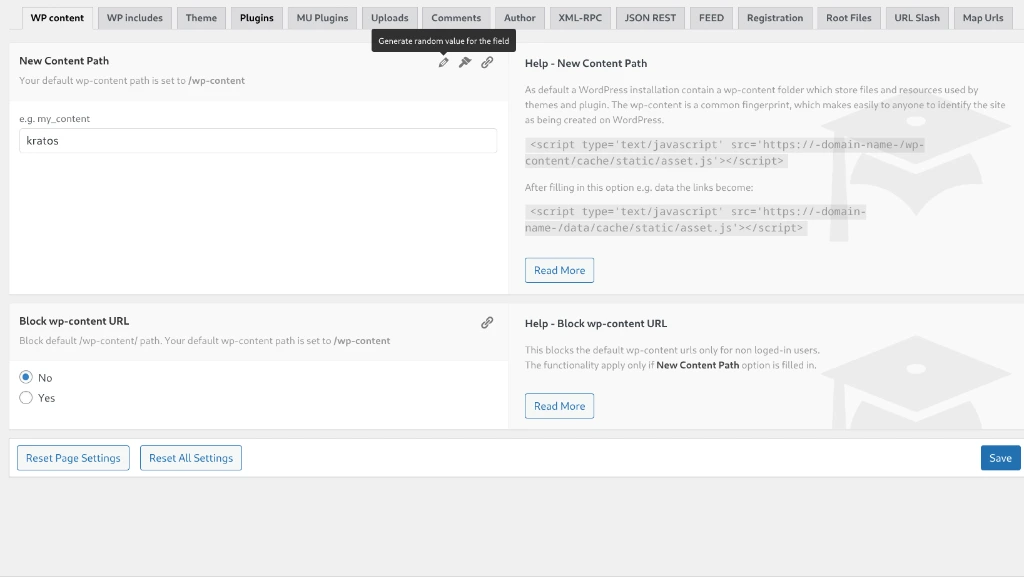
The WP Hide & Security Enhancer plugin is a precision tool for masking WordPress CMS signatures against automated recon bots and exploit discovery scanners.
The extension re-routes sensitive public paths cleanly:
/wp-content/themes/➔/assets/view//wp-content/plugins/➔/assets/modules//wp-includes/➔/core/lib//wp-admin/andwp-login.php➔ custom administrative entry points
5. Performance Engineering: Server Layer vs. Application Layer#
A frequent mistake on slow WordPress sites is installing multiple competing caching plugins hoping to compensate for substandard hosting infrastructure.
The foundational sysadmin rule is straightforward: the best cache is the one that serves the response before invoking the PHP interpreter at all.
| Layer | Recommended Engine | Architectural Role |
|---|---|---|
| Edge / CDN | Cloudflare / Edge Cache | DDoS filtering, Brotli compression, and distributed caching for static assets. |
| Web Server | Nginx FastCGI Cache | Delivers static pre-rendered HTML snapshots from memory or NVMe storage in under 20ms without invoking PHP. |
| Object Cache | Redis / Memcached | Keeps repetitive SQL query results cached in memory via local Unix domain sockets. |
| Asset Optimization | WP Rocket | Handles Critical CSS generation, deferred JavaScript execution, and client-side rendering pipeline improvements. |
WP Rocket complements server-level caching because it targets client-side browser performance: deferring third-party scripts, pruning unused CSS, and orchestrating resource hints that the server itself cannot manage dynamically.
6. Synergies with WPLista: The 101-Step Hardening Checklist#
To ensure your plugin architecture remains hardened over time, cross-reference your environment against my interactive tool WPLista: WordPress Hardening & Optimization Checklist.
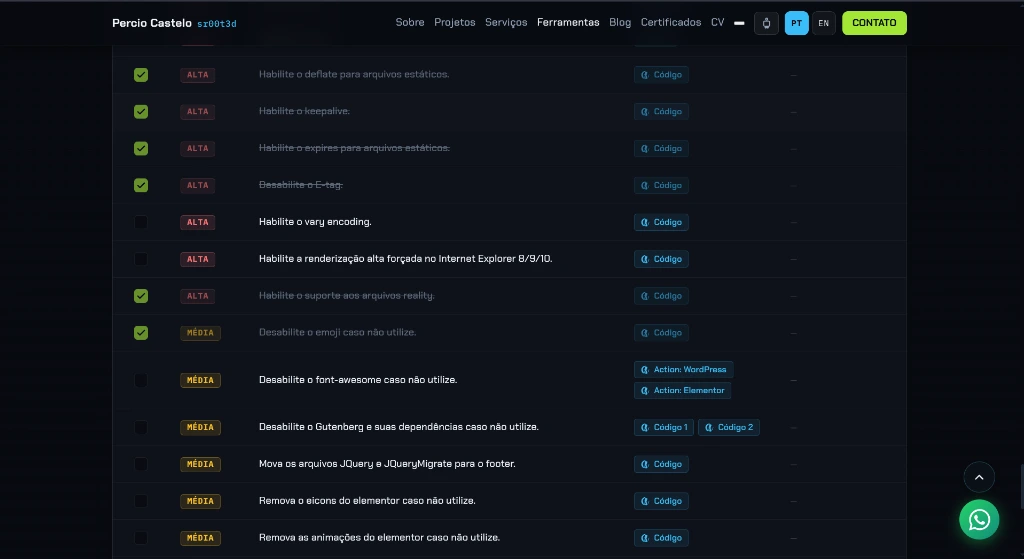
Key checklist intersections include:
- Directives #25 through #28 (Plugin Governance): Maintaining automated staging backups prior to updates, strictly deleting inactive extensions (inactive plugins remain callable local file inclusion vectors), and replacing abandoned packages.
- Directives #43 and #44 (API Surface Hardening): Disabling XML-RPC and restricting REST API exposure when not utilized by headless client applications.
- Directive #66 (Upload and Plugin Isolation): Preventing direct PHP script execution inside
/wp-content/plugins/and/wp-content/uploads/via strict web server directives.
7. Recommended Production Stack: Lean and Defensible#
Rather than installing dozens of single-purpose plugins, maintain a curated, battle-tested stack:
| Operational Role | Primary Recommendation | Why This Choice? |
|---|---|---|
| Visual Site Builder | BricksBuilder | Semantic markup, zero DOM bloat, high PHP throughput, and low maintenance overhead. |
| WAF & Integrity | Wordfence | Early-stage boot firewall (auto_prepend_file) and official repository checksum verification. |
| CMS Signature Cloaking | WP Hide & Security Enhancer | Deep directory masking (with mandatory staging validation). |
| Frontend Optimization | WP Rocket | Refines Core Web Vitals (Delay JS, Critical CSS) without plugin stacking. |
| 2FA & Audit Logging | Melapress (WP 2FA / Activity Log) | Enterprise multi-factor authentication and tamper-evident administrative audit logs. |
| Central Management | WP Umbrella | Centralized uptime, PHP error log aggregation, and controlled remote update staging. |
| Managed Cloud Hosting | Cloudways | Optimized NGINX Lightning Stack, integrated Redis/Varnish caching, and cloud isolation without sysadmin overhead. |
Conclusion: The Principle of Least Privilege#
In production server management, the best piece of code is the one you never had to deploy.
Whenever a business requirement can be solved with a native web server directive in Nginx, a lean Must-Use Plugin (wp-content/mu-plugins/), or core configuration, choose that route before reaching for third-party marketplace software.
To audit your production installation's resilience and speed right now, open our interactive WPLista: WordPress Hardening & Optimization Checklist.
Was this article helpful?
Leave a quick reaction to help prioritize future technical guides:
See also



This post is licensed under CC BY-NC.
Comments
Join the discussion below.
0 comments