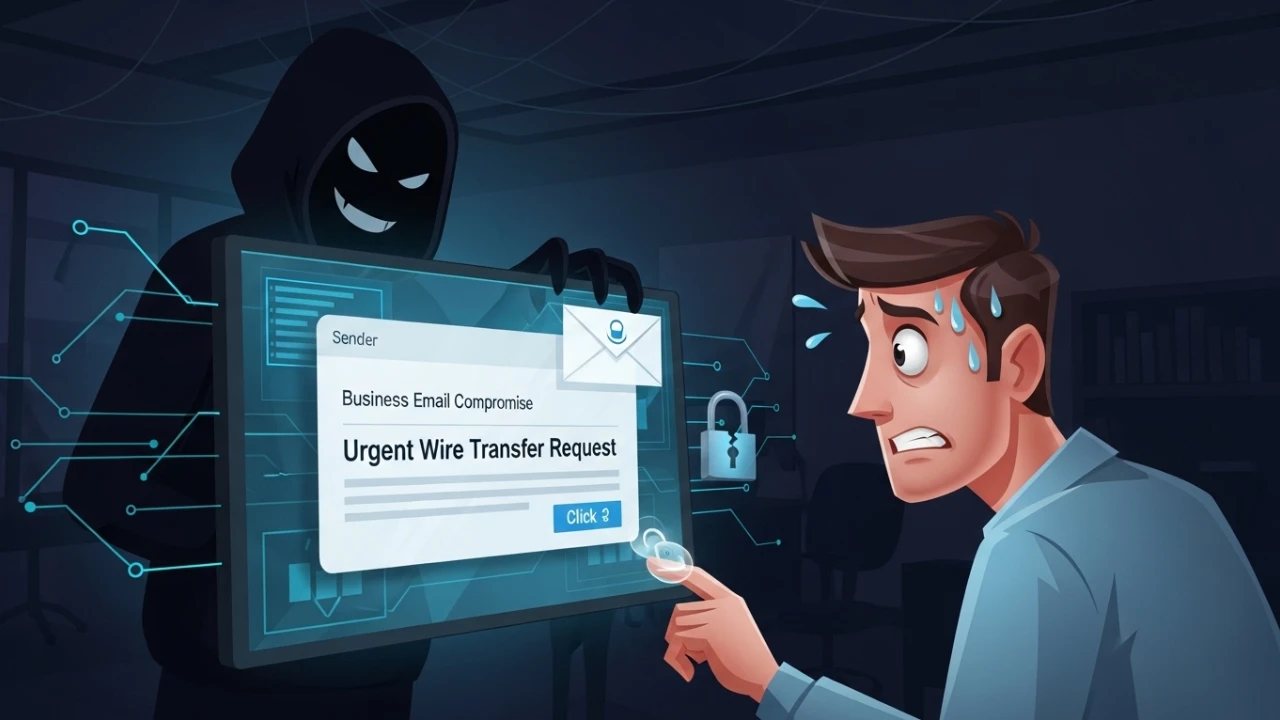
Corporate Email Compromise, commonly known as Business Email Compromise (BEC), is one of the most damaging and stealthy threats for organizations. Unlike ransomware or DDoS attacks, BEC operates entirely within legitimate communication channels - making it nearly invisible to traditional security systems.
Real financial impact#
Before discussing controls, the numbers must be confronted. According to the FBI IC3 (Internet Crime Complaint Center, 2023):
| Metric | Value |
|---|---|
| Global annual losses (US only) | $2.9 billion |
| Average loss per incident | $125,000 |
| Mean time to detection | 87 days (IBM/Ponemon 2023) |
| Incidents resulting in successful payment | ~30% |
| Year-over-year growth (2022 → 2023) | +17% |
Notable real-world cases#
| Organization | Year | Loss | Technique |
|---|---|---|---|
| Facebook & Google | 2019 | $100M | Fake invoices from a real supplier (Quanta Computer) |
| Toyota Boshoku | 2019 | $37M | BEC via fraudulent wire transfer for components |
| Crelan Bank (Belgium) | 2016 | €75M | CEO fraud - attacker impersonated CEO via compromised email |
| FACC (Austria) | 2016 | €42M | Fake president fraud - CEO dismissed following the incident |
In every case, the common factor was trust in the email channel combined with the absence of out-of-band verification for financial transactions.
6 attack vectors in detail#
1. Internal phishing and attack expansion#
Using a compromised account, attackers send malicious emails to coworkers, suppliers, and partners. Because the sender is trusted and familiar, click and response rates are dramatically higher than conventional phishing.
Warning sign: emails sent outside business hours, to unusual recipient groups, or with links to recently registered domains.
2. Direct financial fraud (ceo/cfo fraud)#
Criminals impersonate senior executives (CEO/CFO) and request urgent wire transfers or supplier bank-detail changes. The artificial urgency and apparent authority suppress verification behavior.
Warning sign: unexpected payment requests, requests for confidentiality, changes to an existing supplier's bank account.
3. Confidential data exfiltration#
Corporate mailboxes contain contracts, negotiations, strategic documents, and decision history. Attackers create auto-forwarding rules to continuously exfiltrate content.
Warning sign: forwarding rules created to external domains, sudden increase in outbound email volume.
4. Financial sector fraud (invoice fraud)#
Finance and procurement teams are primary targets. Attackers alter PDF invoices in transit, redirect payments to mule accounts, and manipulate approvals using social engineering over known internal workflows.
5. Corporate espionage#
Unauthorized mailbox access allows monitoring of critical topics: new products, commercial strategies, mergers and acquisitions, pricing decisions - impacting competitiveness and intellectual property.
6. Supply-chain abuse#
Using a trusted corporate identity, attackers engage third parties to execute new scams, induce malware installation, or compromise third-party processes. Compromising a small supplier can be the entry vector into a large corporation.
Technical controls: email authentication#
The first line of defense is ensuring that spoofed emails never reach the inbox. The three fundamental standards omitted from the original article:
SPF - sender policy framework#
; Authorizes only Google Workspace IPs to send email for your domain
; -all (hard fail) rejects any other origin
domain.com. IN TXT "v=spf1 include:_spf.google.com include:_spf.microsoft.com -all"
DKIM - domainkeys identified mail#
; Cryptographic signature binds the email to the sending domain
; The "google" selector is generated in the Workspace admin panel
google._domainkey.domain.com. IN TXT "v=DKIM1; k=rsa; p=MIGfMA0GCSqGSIb3DQEBA..."
DMARC - domain-based message authentication#
; p=reject: rejects messages failing both SPF and DKIM
; rua: receives daily aggregate failure reports
_dmarc.domain.com. IN TXT "v=DMARC1; p=reject; pct=100; rua=mailto:[email protected]; ruf=mailto:[email protected]; fo=1"Verifying authentication in received headers#
# In Gmail: "Show original" / In Outlook: "View source"
# Look for Authentication-Results in the mail header:

Authentication-Results: mx.google.com;
   spf=pass (google.com: domain of [email protected] designates 209.85.220.41 as permitted sender)
   dkim=pass [email protected] header.s=google header.b=AbCdEfGh
   dmarc=pass (p=REJECT sp=REJECT dis=NONE) header.from=domain.com

# If any of these shows "fail", the email is suspicious:
# spf=fail  → sending IP not authorized by SPF record
# dkim=fail → signature invalid or missing
# dmarc=fail → rejection policy triggered
BEC detection: logs, SIEM, and UBA#
Indicators of compromise (IoCs) in email logs#
| IOC | Where to detect | Severity |
|---|---|---|
| Login from unknown IP / unusual country | Azure AD / Google Admin | Critical |
| External forwarding rule created | M365 Audit Log / Gmail Activity | Critical |
| Bulk email sending outside business hours | Exchange Message Trace / Postfix logs | High |
| Password change followed by immediate login | Sign-in logs | High |
| Inbox delegation granted to external account | Admin Audit Log | High |
| Access via disabled legacy protocol (IMAP/POP) | Authentication logs | Medium |
Auditing corporate email platforms#
Microsoft 365 / Exchange Online:
# Check forwarding rules created in the last 30 days
Get-InboxRule -Mailbox [email protected] | Where-Object {$_.ForwardTo -ne $null -or $_.RedirectTo -ne $null}

# Unified Audit Log: suspicious logins
Search-UnifiedAuditLog -StartDate (Get-Date).AddDays(-7) -EndDate (Get-Date) `
  -Operations "UserLoggedIn","MailboxLogin" -ResultSize 1000 | `
  Where-Object {$_.AuditData -match "Unknown"}

# Message Trace for email sending audit
Get-MessageTrace -SenderAddress [email protected] -StartDate (Get-Date).AddDays(-1) `
  -EndDate (Get-Date) | Format-Table Received, SenderAddress, RecipientAddress, Subject
Google Workspace:
# Google Admin Console → Reports → Audit → Gmail
# Filter by: "message_type=email" + "is_inbound=false" + "ip_address NOT IN whitelist"

# Via API (Admin SDK):
# GET https://admin.googleapis.com/admin/reports/v1/activity/users/all/applications/token
# Look for: "gmail.modify" + "gmail.settings.sharing" as anomalous scopes
SIEM integration: key events for uba/ueba alerts#
# Correlation rules (platform-agnostic pseudocode)
rule BEC_ForwardingRuleCreated:
  source: email_audit_log
  condition: event.type == "InboxRuleCreated" AND rule.forward_to CONTAINS "@" AND NOT rule.forward_to ENDSWITH "@domain.com"
  severity: CRITICAL
  action: alert + disable_rule + notify_soc

rule BEC_ImpossibleTravel:
  source: identity_log
  condition: user.login_country != user.previous_login_country AND time_delta < 2h
  severity: HIGH
  action: alert + require_mfa_step_up

rule BEC_MassEmailOutbound:
  source: mail_gateway_log
  condition: sender.email_count_1h > 500 AND sender.avg_daily_emails < 50
  severity: HIGH
  action: alert + throttle_sender
Email security gateways and complementary controls#
Solution comparison#
| Solution | Strengths | Best for |
|---|---|---|
| Proofpoint TAP | Advanced BEC detection, URL sandbox | Large enterprises |
| Mimecast | Email continuity + brand protection | Mid-market |
| Microsoft Defender for Office 365 Plan 2 | Native M365 integration, ATP + AIR | Microsoft environments |
| Google Workspace DLP | Native Workspace integration, content rules | Google environments |
| Abnormal Security | BEC-specific behavioral AI | High-BEC-risk environments |
Data loss prevention (DLP)#
# Example DLP policy to prevent exfiltration via email
# (Microsoft Purview / Google Workspace DLP)
policy_name: "Block PII and financial data in external emails"
conditions:
  - content_matches: ["SSN", "account number", "bank details", "routing number"]
  - recipient_domain: NOT IN ["@domain.com", "@authorized-partner.com"]
actions:
  - block_send
  - notify_sender: "This email contains sensitive data. Use the approved secure channel."
  - notify_compliance: [email protected]
  - log_incident: true
S/mime: end-to-end encryption and digital signatures#
# Generate S/MIME certificate (via openssl for test environments)
openssl req -x509 -newkey rsa:4096 -keyout user_key.pem \
  -out user_cert.pem -days 365 -subj "/CN=John Doe/emailAddress=[email protected]"

# In production: obtain S/MIME certificate from a trusted CA
# (DigiCert, Sectigo, GlobalSign)
# Distribute public certificates to all partners who need to
# verify digital signatures on your outbound emails
BEC incident response procedures#
Immediate phase (0–1 hour)#
### Checklist: immediate BEC response

- [ ] ISOLATE: Revoke all active session tokens for the compromised account
       M365: Revoke-AzureADUserAllRefreshToken -ObjectId <user_id>
       Google: Admin Console → User → Reset Sign-in Cookies

- [ ] CONTAIN: Reset account password with strong random credentials (≥20 chars)
- [ ] PROTECT: Enable MFA immediately if not already active
- [ ] PRESERVE: Export and retain logs before any cleanup
       (Message Trace, Sign-in logs, Audit logs - minimum 90 days)
- [ ] NOTIFY: Engage SOC / internal security team
- [ ] BLOCK: Identify and delete malicious forwarding rules
- [ ] VERIFY: Check for inbox delegations or extra permissions created
Short-term phase (1–24 hours)#
- [ ] Verify whether unauthorized financial transfers occurred
- [ ] Contact banks immediately - SWIFT recall window is 72 hours
       for international wire recall
- [ ] Full audit of emails sent by the compromised account
       (identify internal phishing sent to third parties)
- [ ] Notify clients, partners, and vendors who received emails from the account
- [ ] Check if other systems were accessed with the stolen credentials
       (SSO, VPN, ERP, financial systems)
- [ ] Document the complete incident timeline (for forensics and regulatory use)
Medium-term phase (1–7 days)#
- [ ] Full digital forensics of the compromised user's device
- [ ] Review all accounts with similar access patterns
- [ ] Implement additional controls (Conditional Access, MFA step-up)
- [ ] Targeted awareness training for the affected team
- [ ] Report to authorities where applicable:
       USA: FBI IC3 (ic3.gov)
       EU: National supervisory authority under GDPR (72h deadline)
       Brazil: Police report + ANPD notification (LGPD, 72h deadline)
- [ ] Executive post-incident report with lessons learned
Payment process controls#
Preventive controls#
## Financial process controls against BEC

### Approval layers
- [ ] Payments >$10,000: require 2 independent approvers
- [ ] Payments >$100,000: require CFO approval + 1 board director
- [ ] First payment to a new beneficiary: mandatory 24-hour hold

### Out-of-band verification (critical)
- [ ] ANY change to a vendor's bank details MUST be confirmed via telephone
       to a previously registered number
       (DO NOT reply to the email requesting the change)
- [ ] Maintain an approved bank account whitelist per vendor
- [ ] Bank account changes require approval from the vendor relationship manager

### Monitoring and audit
- [ ] Automated alerts for any bank detail changes in the ERP
- [ ] Immutable audit log of all account changes (who, when, from where)
- [ ] Monthly review of active vendor bank accounts
Fund recovery process#
# If fraudulent transfer occurred:
# 1. Call the bank IMMEDIATELY (not email, not chat)
# 2. Request a "Wire Recall" / SWIFT Recall - 72-hour window
# 3. Provide: transfer reference number, beneficiary IBAN/SWIFT, amount, date
# 4. File a police report (required for bank recall processing)
# 5. Engage legal counsel for cease-and-desist letters to financial institutions

# FBI IC3 reporting portal:
# ic3.gov → File a Complaint
# Include all wire transfer details, beneficiary account info, and communication logs
Awareness program with simulations#
Program structure#
| Stage | Frequency | Content |
|---|---|---|
| Initial training | At onboarding | BEC, phishing, social engineering, internal procedures |
| Reinforcement | Quarterly | Recent real cases, new attack vectors, tabletop simulation |
| Practical simulations | Monthly | Simulated phishing emails (GoPhish / KnowBe4) |
| Targeted campaigns | Semi-annual | High-risk departments (Finance, HR, Procurement) |
Effectiveness metrics#
## Anti-bec program kpis

### Simulation metrics (collected via tool: knowbe4 / gophish)
- Phishing simulation click rate (target: <5%)
- Suspicious email reporting rate (target: >80% of simulated phishing)
- Mean time to report (target: <30 minutes)
- Credential submission rate (target: <1%)

### Operational metrics
- Number of confirmed BEC incidents per quarter
- Total estimated losses avoided (based on detected attempts)
- % of accounts with MFA enabled (target: 100%)
- % of domains with DMARC p=reject (target: 100%)
Warning signs for training#
## How to identify a BEC email

### Artificial urgency signals
❌ "URGENT - transfer now, I can't take calls today"
❌ "Confidential matter - do not mention this to anyone"
❌ "I need this resolved before end of business today"

### Fake domain signals (homoglyphs)
❌ dоmain.com (Cyrillic 'о' instead of Latin 'o')
❌ domain.com.malicious.ru
❌ domain-corp.com vs domain.com

### Quick verification before acting
✅ Call the requester using the number from your contact directory (not from the email)
✅ Check if the sender domain is character-for-character identical to the usual one
✅ Confirm any atypical financial request with your direct manager
✅ Report suspicious emails to SOC/IT even if you didn't click anything
Regulatory compliance#
| Framework | BEC-relevant obligation | Penalty |
|---|---|---|
| LGPD (Brazil) | Notify ANPD and affected individuals within 72h of personal data breach | Up to 2% of national revenue, max R$50M per violation |
| GDPR (EU) | Notify supervisory authority within 72h; document the incident | Up to 4% of global annual turnover |
| PCI-DSS v4.0 | Mandatory logging, access control for cardholder data, annual penetration testing | Card brand fines, loss of processing license |
| SOX (US) | Internal controls over financial reporting, immutable audit trails | Criminal penalties for executives |
| ISO 27001 | Control A.8.7 (malware protection) + A.8.23 (web filtering) | Loss of certification |
Full anti-bec security checklist#
Email authentication#
- [ ] SPF configured with
-all(hard fail) for all sending domains - [ ] DKIM enabled and signing all outbound emails
- [ ] DMARC with
p=rejectpolicy (after progressive rollout viap=none→p=quarantine) - [ ] DMARC reporting (
rua) configured to receive daily aggregate reports - [ ] MFA enabled on 100% of corporate accounts
- [ ] App-based authentication (TOTP/FIDO2) - not SMS (vulnerable to SIM swap)
- [ ] Legacy protocols (IMAP/POP/Basic SMTP auth) disabled at tenant level
Access controls#
- [ ] Least privilege applied to all accounts (semi-annual review)
- [ ] Service accounts with rotated credentials and no interactive MFA
- [ ] Separation of duties for financial processes (approver ≠ executor)
- [ ] Quarterly review of privileged access (Global Admin, Finance roles)
- [ ] Conditional Access: block logins from non-operational countries
Monitoring and detection#
- [ ] Alerts for unusual geolocation logins (impossible travel)
- [ ] Alerts for external email forwarding rule creation
- [ ] Alerts for mailbox configuration changes (delegations, permissions)
- [ ] Centralized logs in SIEM with minimum 12-month retention
- [ ] UBA/UEBA enabled for anomalous behavior detection
- [ ] DLP configured for sensitive data in external emails
Financial process controls#
- [ ] Dual approval for payments above the defined threshold (e.g., >$10,000)
- [ ] Out-of-band phone verification for any vendor bank account change
- [ ] Approved bank account whitelist per vendor
- [ ] 24-hour hold for first payment to a new beneficiary
- [ ] Automated alerts for bank detail changes in ERP
Awareness#
- [ ] Anti-BEC training for all employees at onboarding
- [ ] Quarterly reinforcement with real cases and new vectors
- [ ] Monthly phishing simulations (target: click rate <5%)
- [ ] Suspicious email reporting channel (Report Phishing button in email client)
- [ ] Intensive training for high-risk departments (Finance, HR, C-level assistants)
Incident response#
- [ ] BEC incident response procedure documented and updated (semi-annual review)
- [ ] Emergency contacts defined: SOC, legal, bank, GDPR supervisory authority
- [ ] Wire recall process documented (24h emergency bank contact)
- [ ] Regulatory notification obligations documented (GDPR 72h, LGPD 72h)
- [ ] BEC tabletop exercise conducted at least once per year
Was this article helpful?
Leave a quick reaction to help prioritize future technical guides:
See also


This post is licensed under CC BY-NC.
Comments
Join the discussion below.
0 comments